The Munro tracking app.
Log all 282 peaks.
Munros.app is the dedicated Munro tracking app for iPhone and Android. Log summits with dates and photos, follow GPS routes, check mountain weather, and watch your progress grow towards the complete round.
Download Free — iOS & Android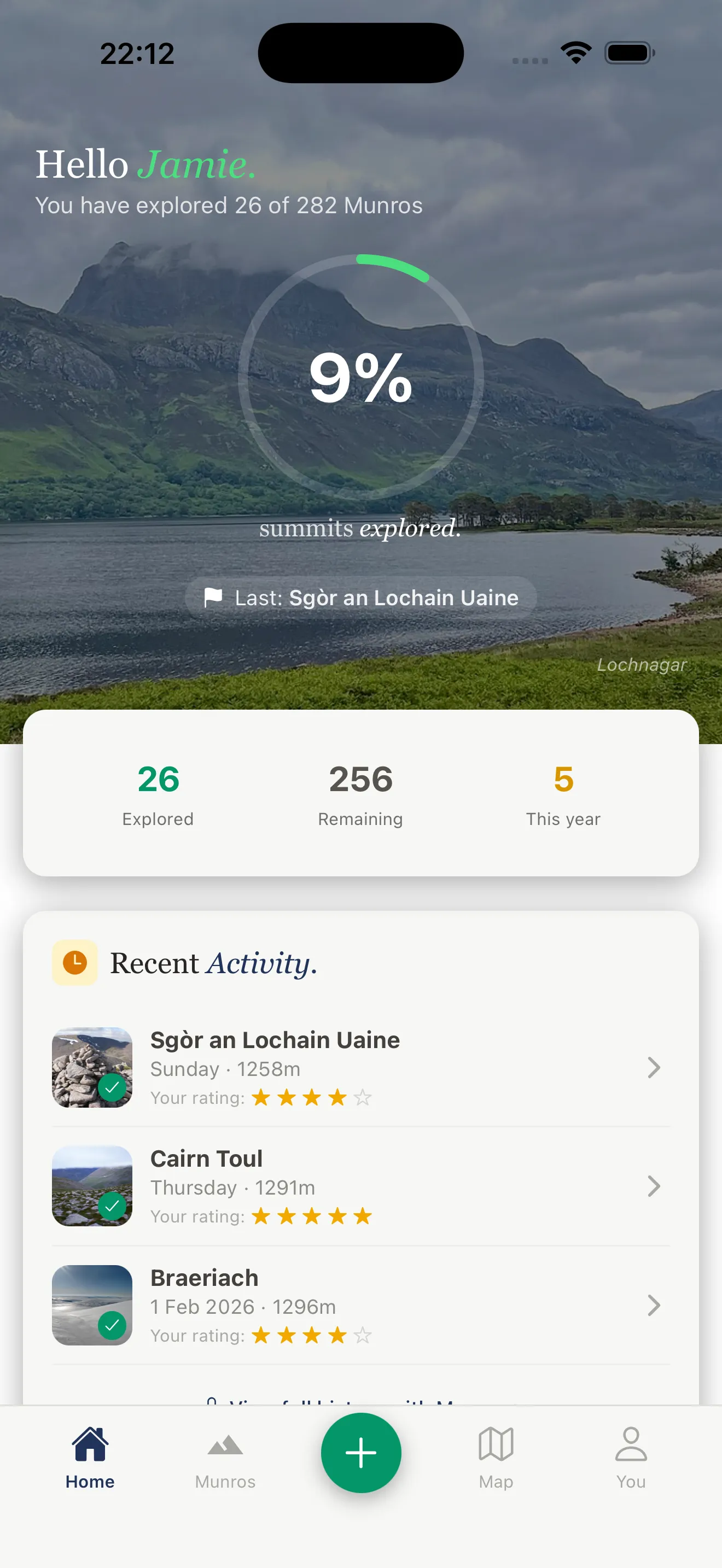
What is the Munros tracking app?
Munros.app is a dedicated Munro tracking app built specifically for hillwalkers pursuing Scotland's 282 peaks. Unlike generic hiking apps that treat Munros as just another waypoint type, Munros.app is built entirely around the Munro bagging experience — from your first summit to your last.
The app contains every one of the 282 Munros with individual summit pages, multiple walking routes, GPS tracks, elevation profiles, parking information, and summit weather forecasts. As you tick off each peak, your personal progress dashboard updates in real time — showing your completion count, percentage, and a breakdown by region and height band.
Munro tracking on paper or spreadsheets works, but it tells you nothing when you're on the hill. The Munros app puts live GPS position, offline maps, and at-altitude weather forecasts in your pocket — everything you need from the car park to the cairn and safely back down.
Everything the Munro tracking app includes
Six core features designed specifically for Munro baggers, from first-timers to experienced hillwalkers chasing their compleation.
Summit Tracking & Log
Log every Munro summit with the date, photos, conditions, and personal notes. Your summit log is stored in the cloud and syncs across all your devices. Never lose track of where you've been.
Progress Dashboard
See your Munro completion at a glance. Total summits, percentage complete, highest peak bagged, and a region-by-region breakdown. The dashboard updates the moment you log a new summit.
GPS Route Navigation
Follow GPS-tracked routes for every Munro with your live position shown on the map. Elevation profiles, distance covered, and time elapsed displayed in real time as you climb.
Offline Maps
Download maps before you leave home. The Munros app works completely offline — essential for remote peaks in Knoydart, Torridon, and the Cairngorms where mobile signal is non-existent.
Summit Weather Forecasts
Real mountain-top weather forecasts, not valley readings. Wind speed, visibility, cloud-free percentage, and precipitation probability at summit elevation — updated hourly.
Community Leaderboards
See how your Munro count compares with friends and the wider community. Activity feed, achievement badges, and the motivation that comes from knowing others are out on the hills too.
How Munro tracking works
Getting started with the Munro tracking app takes about two minutes.
Download the app
Free on the App Store and Google Play. Create an account with Apple or Google Sign-In — no password needed.
Find your Munro
Browse all 282 peaks or search by name, region, or difficulty. Each Munro has routes, parking, and a weather forecast.
Navigate to the summit
Follow the GPS route with your live position. Download offline maps before you leave — most remote Munros have no signal.
Log your summit
Tap to log the summit with date, photos, and conditions. Your progress dashboard updates instantly. 1 down, 281 to go.
Munro tracking app vs other methods
Most Munro baggers start with a paper list or spreadsheet. Here's why a dedicated tracking app is better on the hill.
Munros.app
- GPS navigation with live position
- Offline maps — no signal needed
- Summit weather at altitude
- 282 Munros with full route data
- Automatic progress dashboard
- Cloud backup — never lose your log
- Community and leaderboards
- Free to download
Paper Tick List
- Simple and offline
- No GPS navigation
- No weather forecasts
- No route information
- Manual tracking only
- Can be lost or damaged
- No community features
- Free
General Hiking Apps
- GPS and offline maps
- Not Munro-specific
- No Munro progress tracking
- No bog ratings or scramble grades
- No summit weather per peak
- No Munro community
- Often expensive subscription
- Not built for bagging
Why use an app to track your Munro progress?
Munro bagging is a long game. Most people take ten to twenty years to complete all 282 peaks, fitting them around work, family, and Scottish weather. Over that kind of timeframe, a reliable tracking system matters.
A dedicated Munro tracking app solves problems that paper lists and spreadsheets cannot. You always have your progress with you. You can see, before you leave home, exactly which peaks remain in a region you're planning to visit — and which routes suit your current fitness and the forecast conditions. And when you summit, you can log it on the spot with the exact date, a photo from the cairn, and a note about conditions. No transcribing from memory the following week.
The progress dashboard also matters more than it sounds. Seeing your completion percentage tick upward — and watching your tally cross milestones like 50, 100, 150, 200 — is a genuine motivator. Many baggers find that the tracking itself becomes part of the satisfaction of the pursuit.
Compatible devices: iPhone and Android
The Munros tracking app is available for iPhone (iOS 15 and above) and Android (version 10 and above). It runs on iPhone, iPad, and all Android smartphones and tablets. The app is optimised for use in the Scottish Highlands — fast to load, efficient with battery, and designed to work reliably in cold and wet conditions.
The offline map download feature is essential for Munro bagging. Before you drive north, download the offline map tiles for your target area. Once downloaded, the GPS tracking and route navigation work completely without mobile signal — which covers most of the Cairngorms, Knoydart, Torridon, Fisherfield, and the remote northwest Highland peaks.
Munro tracking for beginners
You don't need to have bagged a single Munro to download the app. Many people install it before their first summit, use the route guides and weather forecasts to plan safely, and log their very first peak from the cairn. The app is built for beginners as much as for seasoned baggers — with difficulty ratings, bog scores, estimated times, and clear parking information for every one of the 282 peaks.
For beginners, we recommend starting with the easiest Munros — well-marked routes with manageable gradients, ideal for building confidence. Ben Lomond, Ben Chonzie, and Schiehallion are the most popular first Munros, and all are covered in full in the app.
Frequently Asked Questions
Common questions about the Munro tracking app.
Is there an app for tracking Munros?
What is the best Munro tracking app?
Is the Munro tracking app free?
Does the Munro tracking app work offline?
Can I track all 282 Munros on the app?
Does the Munro app work on iPhone and Android?
Can I use the app to plan routes before I go?
Ready to start tracking?
Track all 282 Munros for free. Download on the App Store and log your first summit today.